Showing posts with label My Own Creation. Show all posts

06:40

Awasome 3D Transaction Social Widget on Mosue Hover Version 2..!!!


         Hi Guys Today I am here with one more CSS3 3D Transaction Widget.. Its The Modification or Let's say  before Version of the "Awesome 3D Transaction Social Widget on Mosue Hover..!!!"  ..


  Take A look at it..How it Looks.. Live Demo


 So If you are New To My Blog you can have a look at my Previous Post Similar to this @


So before Lets Begin as Usuall


How To Add This Widget This your Blog: 

  • Login to your "Blogger Account" and Go to your Blog "Dashboard"...
  • Now Go to "Layout Section" from your "Dashboard"...
  • Now Click On "Add Gadget" and Select "HTML/Java Script"...
  • Now Copy and Paste the Below Given Set of Codes in it...
<link rel="stylesheet" href="https://googledrive.com/host/0B_7JWdEqBhVVbThSWkRoNDZQc00"/>
                          
<div class="maincont">

<div class="container">
          
<ul class="ch-grid">
<li>
<div class="ch-item ch-img-1">              

<div class="ch-info-wrap">

<div class="ch-info">

<div class="ch-info-front ch-img-1"></div>

<div class="ch-info-backfb">

<h3>Facebook</h3>
<a href="https://facebook.com/mjntech">Like Our Facebook Page</a>
</div>
    </div>
        </div>
            </div>
    </li>

<li>

<div class="ch-item ch-img-2">
  
<div class="ch-info-wrap">
  
<div class="ch-info">
      
<div class="ch-info-front ch-img-2"></div>

<div class="ch-info-backgp">
                                      
<h3>Google+</h3>
                              
<a href="https://plus.google.com/117524639868275216387">Add us on Google+</a>
                          
</div>
                              
</div>
                          
</div>
                      
</div>
                  
</li>
                  
<li>
                      
<div class="ch-item ch-img-3">
                          
<div class="ch-info-wrap">
                              
<div class="ch-info">
                                  
<div class="ch-info-front ch-img-3"></div>
                                  
<div class="ch-info-backtw">
                                      
<h3>Twitter</h3>
<a href="http://twitter.com/manjunathg17">Follow on Twitter</a>
</div>
                              
</div>
                          
</div>
                      
</div>
                  
</li>
              
</ul>
              
</div>

</div>
  • Add The Title As you wish and Click Save!!!!!!!!
That's it all Done...

Customization: 

Now Replace Links Text Highlighted in Color Facebook,Twitter,Google+ with your Link..


Useful Note:

Important Note:


  • You Can Comment If any Problem Persist.. or Need Help With This Widget..
  • Any Query or Help Related to this or any other related to Blogger Feel Free to Contact Us..
    Within 24 to 48 hours we will get your back the answer for your Question.. .


I hope you all liked and Enjoyed the post..

Join our Facebook Fan Page  .:MJN Tech:.
and
Subscribe for More Latest Updates..

With Regard's
Read Article

22:15

Awasome 3D Transaction Social Widget on Mosue Hover..!!!


         Hi guys after a long time ..May be a month I am once again back with New and Effective CSS3 Widgets !!!.. This is also one of the Widget which Join's the Category of "My Own Creation"  ..

           I am Very Much Exited to post or share this Widget.. Because this is my most favourite widget with awasome css3 transactions effect..Thanks to "Codrops" for sharing CSS3 Hover Effect Tutorials ..Which Inspited me to make this widget...


           Take A look at it..How it Looks.. Live Demo

          This Widget has Two Versions.. One is colored and other is Non-Colored Version. Only with color code this two varies.. You can also change the Colors According to your Wish or Your Template..You can use our Blog's "HTML Modifier or Editor" to edit HTML and CSS and for Color Codes you can try Our Blog's "Hexadecimal Color Code Generator"...

OK!! Let's Begin as Usual..


How To Add This Widget This your Blog: 

  • Login to your "Blogger Account" and Go to your Blog "Dashboard"...
  • Now Go to "Layout Section" from your "Dashboard"...
  • Now Click On "Add Gadget" and Select "HTML/Java Script"...
  • Now Copy and Paste the Below Given Set of Codes in it...

<link rel="stylesheet" href="https://googledrive.com/host/0B_7JWdEqBhVVdk11eHpTT0xyd28"/>

<div class="maincont">
<div class="container">
<section class="main">
<ul class="ch-grid">
<li>
<div class="ch-item">              
<div class="ch-info">
<div class="ch-info-front ch-img-1"></div>
<div class="ch-info-backfb">
<h3>Facebook</h3>
<p>Like Our Page .:MJN Tech:.<a href="http://facebook.com/mjntech">Like us On Facebook</a></p>
</div>  
</div>
</div>
</li>
 <li>
 <div class="ch-item">
<div class="ch-info">
<div class="ch-info-front ch-img-2"></div>
<div class="ch-info-backgp">
 <h3>Google+</h3>
<p>Add Us To your Circle<a href="https://plus.google.com/117524639868275216387">Add Us On Google+</a></p>
 </div>
 </div>
</div>
</li>
<li>
<div class="ch-item">
<div class="ch-info">
<div class="ch-info-front ch-img-3"></div>
<div class="ch-info-backtw">
<h3>Twitter</h3>
<p>Join Us on Twitter<a href="http://twitter.com/manjunathg17">Follow Us on Twitter</a></p>
</div>
</div>
 </div>
</li>
 </ul>
</section></div>
</div>

  • Add The Title As you wish and Click Save!!!!!!!!
That's it all Done...

Customization: 

Now Replace Links Text Highlighted in Color Facebook,Twitter,Google+ with your Link..


Useful Note:

Important Note:


  • You Can Comment If any Problem Persist.. or Need Help With This Widget..
  • Any Query or Help Related to this or any other related to Blogger Feel Free to Contact Us..
    Within 24 to 48 hours we will get your back the answer for your Question.. .


I hope you all liked and Enjoyed the post..

Join our Facebook Fan Page  .:MJN Tech:.
and
Subscribe for More Latest Updates..

With Regard's
Read Article

02:15

Simple but Cool & Awesome CSS3 Social Profile Widget with Zooming and Shrinking Effect ..


                         Today I am Adding One More Widget For "My Own Creation Group or Category".. As you all know I have 3 Widgets of My Own Creation in Before Posts.. So Today Let Me Share My Fourth Widget ..Its Simple Widget Made Using "CSS3" Effects..


Animated Preview :

Also See : How to Create Animated GIF Like Previewing Below..


This Widget Is Made Using the Concept Of Combined CSS3 Tutorials of Different Sites.. Thanks to them.. 

Live Demo ↓ :

So Now Lets get Started !!!

How to add this Widget to your Blog..
  • First Go to "Blogger" >> Then Go to your Blog "Dashboard"..
  • Now Click on Layout Section in the Left Side of your Blog "Dashboard"..
  • Now click on "Add Gadget" ..
  • You will get Many Options ..Scroll Down And Click on to "HTML/Java Script"..
  • Now Paste The Below Code in it..

<link rel="stylesheet" href="https://googledrive.com/host/0B_7JWdEqBhVVN0NkbjZoUGctRFU"/>
<br />
<ul class="ca-menuf">
<li>
<a href="https://facebook.com/mjntech">
<div class="ca-contentf">
<h2 class="ca-mainf">
Facebook</h2>
<h3 class="ca-subf">
Like Us on Facebook</h3>
</div>
</a>
</li>
</ul>
<ul class="ca-menut">
<li>
<a href="https://twitter.com/manjunathg17"><div class="ca-contentt">
<h2 class="ca-maint">
Twitter</h2>
<h3 class="ca-subt">
Follow Us on Twitter</h3>
</div>
</a>
</li>
</ul>
<ul class="ca-menug">
<li>
<a href="https://plus.google.com/u/0/116155905562588571799"><div class="ca-contentg">
<h2 class="ca-maing">
Google+</h2>
<h3 class="ca-subg">
Add Us on Google+</h3>
</div>
</a>
</li>
</ul>
<ul class="ca-menur">
<li>
<a href="https://feedburner.google.com/fb/a/mailverify?uri=mjntech"><div class="ca-contentr">
<h2 class="ca-mainr">
RSS</h2>
<h3 class="ca-subr">
Subscribe  Us on RSS</h3>
</div>
</a>
</li>
</ul>
<script src="http://ajax.googleapis.com/ajax/libs/jquery/1.6.4/jquery.min.js" type="text/javascript"></script>


  • Now click save..That's it ..all Done!!


  •   Customization :

    • Now Replace Links Text Highlighted in Color Facebook,Twitter,Google+,RSS with your Link.. 


    Useful Note:

    • Update !!!!!!!! Made the CSS Code Shorter by Adding Link..
    • You can Also  Edit this Widget like Width,Colour etc using HTML Editor of our Blog   : HTML Editor..
    • You can Use Hexadecimal Color Code  Generator of our Blog to Replace Colors  : HexaDecimal Color Code Generator..


    Important Note:

    • You Can Comment If any Problem Persist.. or Need Help With This Widget..
    • Also in Some Templates it may not be perfect.. In that Case Contact me..


    I hope you have found this post helpful..
    Don't forget to Subscribe , Comment and Share this post..
    With Regard's ,

    Read Article

    05:13

    Animated CSS3 Metro UI Drop Down Menu With Sliding Tiles Effect v1.0 by MJN..

                         I have Posted My First Two Creation Using CSS3   Earlier In my Posts Before,, Those are
    1.  Metro UI Social Profile and Search Box with Zoom & Glow Effects Widget v1.0 by MJN For Blogger ..
    2.  Simple and Stylish Ribbon UI Social Profile Widget v1.0 by MJN For Blogger..
    So after Working on Those Two Metro UI and Ribbon UI Widgets today  I am Here With One More Metro UI Drop Down Menu Using CSS3.. 


    I think and Hope you all Will Like it..    Take A Live Preview    Live Demo

    So let me Share you this Awesome Drop Down Menu.. 

    How to Add this to your Blog:

    • First Go to "Blogger" and Go to  your Blog Dashboard..
    • Now Click On "Layout" In Left Side of your Blog..
    • Now Click on "Add Gadget"..
    • You Will Get Many Widgets..Scroll Down to "HTML/JavaScript"..
    • Click On "HTML/JavaScript"..
    • Now Paste This Below Set of Code in it..


    <!doctype html public "-//W3C//DTD XHTML 1.0 Strict//EN" "http://www.w3.org/TR/xhtml1/DTD/xhtml1-strict.dtd">


    <link rel="stylesheet" href="https://googledrive.com/host/0B_7JWdEqBhVVNTFlRld1RUpVeUE"/>


    <div class="mjn-metro-menu">

    <!-- defining top menu elements -->
    <ul class="navi">
     <li id="n1"><a class="mjn-tab1" href="http://mjntechtips.blogspot.in/" title="Home" ></a>
    <!-- defining sub menu elements --><ul class="sub">
     <li class="l"><a class="mjn-fb" href="https://www.facebook.com/mjntech" title="Like Us on Facebook"></a></li>
     <li class="c"><a class="mjn-tw" href="https://www.twitter.com/manjunathg17" title="Follow Us on Twitter"></a></li>
      <li class="r"><a class="mjn-g" href="https://plus.google.com/u/0/116155905562588571799"></a></li>
    <li class="r1"><a class="mjn-rss" href="https://feeds.feedburner.com/mjntech"></a></li>
    </ul>
    </li>
    <li id="n2"><a class="mjn-tab2" href="http://mjntechtips.blogspot.in/search/label/" title="Tags" ></a>
    <ul class="sub">
    <li class="l"><a class="mjn-tab2sub" href="http://mjntechtips.blogspot.in/search/label/Windows"title="Windows"><span>Windows</span></a></li>
    <li class="c"><a class="mjn-tab2sub" href="http://mjntechtips.blogspot.in/search/label/Blogger" title="Blogger"><span>Blogger</span></a></li>
     <li class="r"><a class="mjn-tab2sub" href="http://mjntechtips.blogspot.in/search/label/CSS3" title="CSS/HTML"><span>CSS/HTML</span></a></li>
    <li class="r1"><a class="mjn-tab2sub" href="http://mjntechtips.blogspot.in/search/label/Softwares" title="Softwares"><span>Softwares</span></a></li>
    </ul>
    </li>
    <li id="n3"><a class="mjn-tab3" href="mjntechtips.blogspot.in/2013/" title="Blog Archive" ></a>
    <ul class="sub">
    <li class="l"><a class="mjn-tab3sub" href="mjntechtips.blogspot.in/2013/"><span>2013</span></a></li>
    <li class="c"><a class="mjn-tab3sub" href="mjntechtips.blogspot.in/2013/"><span>2012</span></a></li>
    <li class="r"><a class="mjn-tab3sub" href="mjntechtips.blogspot.in/2013/"><span>2011</span></a></li>
    <li class="r1"><a class="mjn-tab3sub" href="mjntechtips.blogspot.in/2013/"><span>2010</span></a></li>
    </ul>
    </li>
    <li id="n4"><a class="mjn-tab4" href="http://mjntechtips.blogspot.in/p/blog-page.html" title="Contact Us" ></a>
    <ul class="sub">
    <li class="l"><a class="mjn-tab4sub" href="#"><span>LINK 1</span></a></li>
    <li class="c"><a class="mjn-tab4sub" href="#"><span>LINK 2</span></a></li>
    <li class="r1"><a class="mjn-tab4sub" href="#"><span>LINK 3</span></a></li>
    <li class="r"><a class="mjn-tab4sub" href="#"><span>LINK 4</span></a></li>
    </ul>
    </li>
    <li id="n5"><a class="mjn-tab5" href="#" ><span></span></a>
    </li>
    </ul>
    <div style="clear:both"></div>
    </div>
    </!doctype>


    • Now Click Save and Drag it to your desired position..


      Customization :

    • Now Replace Links Text Highlighted in Color Facebook,Twitter,Google+,RSS and other in Red with your Link.. 
    • Replace the Names Highlighted in  Pink with your Words appropriate to link given..
    •  


    Useful Note:


    Important Note:
    • You Can Comment If any Problem Persist.. or Need Help With This Widget..
    • This will be updated soon  with much more Menu's i.e.,Multilevel As soon as possible.
    • So Join our Blog and Subscribe for latest news updates..


    I hope you have found this post helpful..
    Don't forget to Subscribe , Comment and Share this post..
    With Regard's ,

    Read Article

    23:29

    Simple and Stylish Ribbon UI Social Profile Widget v1.0 by MJN For Blogger..

                               As you all know My First Attempt in CSS3 was and also is "Metro UI Social Profile and Search Box with Zoom & Glow Effects Widget v1.0 by MJN For Blogger " .. So I am here Today with another Social Profile Widget which is one of "MY Own Creation" with Ribbon UI..


    Live Demo of Ribbon UI Social Profile Widget..


    So After Previewing Live Demo I think you are "Happy!!" to add it to your Blog or Site..

    Let's Begin !!!!!!

    How to   Add Ribbon UI Social Profile Widget For Blogger :
    • First Go to "Blogger" and then go to your Blog "Dashboard"..
    • Now go to "Layout Section" which is in Left side of your Blog "Dashboard"..
    • Now click on "Add Gadget" .. Scroll Down and Click on "HTML/JavaScript"..
    • Now Paste the Below Code in it..
    <style>
    .mjn-social_ribbon_icons a{
        width:48px;
        height:100px;
        margin-top:10px;
        display:inline-block;
        text-indent:-9999em;
        background-position:0 0;
        background-repeat:no-repeat;
        z-index:2000;
        overflow:hidden;
    }
    .twitter{ background:url('https://blogger.googleusercontent.com/img/b/R29vZ2xl/AVvXsEi0cZMJ0OQHAoSrwSAGkpDL7NiXlsnY8i9Jr5ds0MDfslaLFVfKKarUZKgmlhVaq_azpmaSNtqFhY9mkTOtqAf0FjYYoBa795zxX99_n6R0Nk8r1kG3KdKssKaayXD9ufXQZ-UV8d3TO4E/h120/Twitter+R.png'); margin-bottom:10px; }
    .facebook{ background:url('https://blogger.googleusercontent.com/img/b/R29vZ2xl/AVvXsEg0V1kKMgntgzk-291iMoQyBf6RcXBVU6p1ss9HVnbgNQ45Orr5CRwt1HY3YTtUUhqEzJWhjOLk8JJ5wh22Goay29tObSyrtGrwPZHWLPbln_Q3rVVzFf6k0BBsbFVVfYa4F4MFsRVfnvk/h120/Facebook+R.png'); margin-bottom:10px; }
    .google{ background:url('https://blogger.googleusercontent.com/img/b/R29vZ2xl/AVvXsEjC_q8sdyba3ds_kAbQQDSPFxZuPgE-bXCS2BCwqzTNJ1CWMDmaL0bKCZ43bF9xGilCmpGx5CkwMLNiSMWK5oEBDPd4hQ868Mjcaff2zrwX6wtMW8z0vhQeHmfkne2HfB7LpumZvdsmmcw/h120/Google++R.png'); margin-bottom:10px; }
    .rss{ background:url('https://blogger.googleusercontent.com/img/b/R29vZ2xl/AVvXsEjepMpUiHMGCx3t2jVR_4R5bUwpLooX82NY-3AWLkKJ7fkIRvTmRl7hsAy6wRAv5svIW91DGGXTUM2emwz82DNRryq81PN-LMGKBc662IT6UUl4r6D30nCZ0D7Im3N338UBA_qLYy77FdA/h120/RSS+R.png'); margin-bottom:10px; }
    .twitter:hover{
    border-top: 2px solid transparent;
    box-sizing:border-box;
    -moz-box-sizing:border-box;
    -webkit-box-sizing:border-box;

    }
    .facebook:hover{
    border-top: 2px solid transparent;
    box-sizing:border-box;
    -moz-box-sizing:border-box;
    -webkit-box-sizing:border-box;
    }
    .google:hover{
    border-top: 2px solid transparent;
    box-sizing:border-box;
    -moz-box-sizing:border-box;
    -webkit-box-sizing:border-box;
    }
    .rss:hover{
    border-top: 2px solid transparent;
    box-sizing:border-box;
    -moz-box-sizing:border-box;
    -webkit-box-sizing:border-box;
    }
    </style>
       
    <div class="mjn-social_ribbon_icons">
    <a href="http://www.facebook.com/mjntech" class="facebook" title="Follow us on Facebook">Facebook</a>
    <a href="http://www.twitter.com/manjunathg17" class="twitter" title="Follow us on Twitter">Twitter</a>
     <a href="https://plus.google.com/u/0/116155905562588571799" class="google" title="Follow us on Google+">Google+</a>
    <a href="http://feeds.feedburner.com/mjntech" class="rss" title="Subscribe Us on RSS">RSS</a>
        </div>


  • Now click save..That's it ..all Done!!


  •   Customization :

    • Now Replace Links Text Highlighted in Color Facebook,Twitter,Google+,RSS with your Link.. 


    Useful Note:


    Important Note:
    • You Can Comment If any Problem Persist.. or Need Help With This Widget..


    I hope you have found this post helpful..
    Don't forget to Subscribe , Comment and Share this post..
    With Regard's ,

    Read Article

    04:45

    Metro UI Social Profile and Search Box with Zoom & Glow Effects Widget v1.0 by MJN For Blogger ..

                          You may have Seen Many CSS3 Widgets in my before Posts of my blog.. If you are new to my blog .:MJN Tech:. you can have a look at my before posts.. and also subscribe for Much More Latest Updates.. Before Posts of CSS3 Category was not made by my own but shared it  so that it will be helpful to you all..
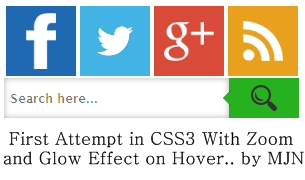
                           But Today's I am here to share My First Attempt In Making Widgets Using CSS3 & HTML.. Hope you all like it and also thinking to update it using much more effects lately..

    So let's get back to it..

    First attempt in CSS3, Zoom and Glowing Effect Widget by MJN

    Here is a Live Demo :  Make Sure That the Images Loads completely..


  • How to add this to your Blog ?? Here it is..
    • Go to Blogger and go to your blog..
    • Now go to Layout in Left side of your Blogger Dashboard..
    • Now click on Add Gadget and Choose HTML/JavaScript..
    • Now paste the Below Set of codes in it..
    <style>
    .mjn-metro-social
    {
    width:300px;
    }
    .mjn-metro-social li
    {
    position:relative;
    cursor:pointer;
    padding:0;
    list-style:none;
    }
    .mjn-metro-social .fb,.tw,.gp,.pi,.in,.yt,.fd
    {
    z-index:7;
    float:left;
    margin:2.5px;
    position:relative;
    display:block;
    }
    .mjn-metro-social .tw
    {
    background:url(https://blogger.googleusercontent.com/img/b/R29vZ2xl/AVvXsEjQulwbBMnKmsfRx0POzvWB2L96NKXsX7LZjoxQ33GNAcX7So9NFRAiG6Fe3R7nC42HksQLkgMY4SofZRzchlbbW_dGnRFBtx5t5entIzhlcytb1m94ojaaX_xBL2JAzoJMl5wH-Qu7Xuw/h120/twitter-bird-dark-bgs.png) no-repeat center center #43b3e5;
    width:70px;
    height:70px;
    -webkit-transition: box-shadow .3s linear, background .2s linear;
    -moz-transition: box-shadow .3s linear, background .2s linear;
    -ms-transition: box-shadow .3s linear, background .2s linear;
    -o-transition: box-shadow .3s linear, background .2s linear;
    transition: box-shadow .3s linear, background .2s linear;
    }
    .mjn-metro-social .fb
    {
    background:url(https://blogger.googleusercontent.com/img/b/R29vZ2xl/AVvXsEig0PkzBvJ6yX3wb3bA-FnBs3mldrtIpOsKEOmSWPAniZThvUnV75mjGu8ZnA5a2Scx_f9Z-om5OP57CPaGbsj9rKbY1I0KVT_imrB47BFIjiw9xAk_uMf4Go4aCUmsMz0nnJ2yMLoBVZ8/h120/facebookf.png.png) no-repeat center center #1f69b3;
    width:70px;
    height:70px;
    -webkit-transition: box-shadow .3s linear, background .2s linear;
    -moz-transition: box-shadow .3s linear, background .2s linear;
    -ms-transition: box-shadow .3s linear, background .2s linear;
    -o-transition: box-shadow .3s linear, background .2s linear;
    transition: box-shadow .3s linear, background .2s linear;
    }
    .mjn-metro-social .gp
    {
    background:url(https://blogger.googleusercontent.com/img/b/R29vZ2xl/AVvXsEii2BXQh4OB62iwqr6bxaehbhAYmpzMa6iqzFVuT9KaIitHepXXhcCI6FkjOfbFV31PGat-8ivlSibqnqzYrcXcd-NFFluDQXePnX47zVrnZsoo_SE6c40BIhyphenhyphenbY2LhYLWrNbnbA0OxT00/h120/google+plus.png) no-repeat center center #da4a38;
    width:70px;
    height:70px;
    -webkit-transition: box-shadow .3s linear, background .2s linear;
    -moz-transition: box-shadow .3s linear, background .2s linear;
    -ms-transition: box-shadow .3s linear, background .2s linear;
    -o-transition: box-shadow .3s linear, background .2s linear;
    transition: box-shadow .3s linear, background .2s linear;
    }
    .mjn-metro-social .fd
    {
    background:url(https://blogger.googleusercontent.com/img/b/R29vZ2xl/AVvXsEiSWik21LDLYj6zRL0FnbdbT_B6IeTwEkK2L95p4b59u2u6DZLu3MmNwUl5uzoweLXsLHP5S-NDfxU0qFaJw6T6w7o2UGElDUMw9DYpN2J2kCI4zJIhJiNP8pi7YRKbCiTgIxcTLdI32QA/h120/feed.png) no-repeat center center #e9a01c;
    width:70px;
    height:70px;
    -webkit-transition: box-shadow .3s linear, background .2s linear;
    -moz-transition: box-shadow .3s linear, background .2s linear;
    -ms-transition: box-shadow .3s linear, background .2s linear;
    -o-transition: box-shadow .3s linear, background .2s linear;
    transition: box-shadow .3s linear, background .2s linear;
    }
    .mjn-metro-social li:hover .fb
    {
    background:url(https://blogger.googleusercontent.com/img/b/R29vZ2xl/AVvXsEhoufjylJBmxED6WGURsnNgtpBOyWSqC-SmKMlIdsyh_IwyJhnrBgwFeGI4QEtny3oFetBqZgHO7snxAJYtdIm-ZSEtNK7Q1-DyUf1GNW6X4eZ3KlTiL1wYi4cBtEPsKJBqSvplEzyGVVs/h120/facebookfh.png) no-repeat center center #1f69b3;
     box-shadow:0px 0px 6px 3px #217BC0;
    -webkit-box-shadow:0px 0px 6px 3px #217BC0;
    -moz-box-shadow:0px 0px 6px 3px #217BC0;
    -o-box-shadow:0px 0px 6px 3px #217BC0;
    -ms-box-shadow:0px 0px 6px 3px #217BC0;
    }
    .mjn-metro-social li:hover .tw
    {
    background:url(https://blogger.googleusercontent.com/img/b/R29vZ2xl/AVvXsEhXkUZeAqg6YBHVBNkDTurN2yeGTnC2K9KQT9VC7OULvF4ycuKo27_68Hq-tsMDJWC1eRRKeu-R6DP8gn0FguTsUzEDu4POC4_cwqc5Q3_sU7GhU3-cYBmy_uYBzS4090wRCYwtXs-CyQ4/h120/twitter-bird-dark-bgsx.png) no-repeat center center #43b3e5;
     box-shadow:0px 0px 6px 3px #38D1F7;
    -webkit-box-shadow:0px 0px 6px 3px #38D1F7;
    -moz-box-shadow:0px 0px 6px 3px #38D1F7;
    -o-box-shadow:0px 0px 6px 3px #38D1F7;
    -ms-box-shadow:0px 0px 6px 3px #38D1F7;
    }
    .mjn-metro-social li:hover .gp
    {
    background:url(https://blogger.googleusercontent.com/img/b/R29vZ2xl/AVvXsEhWtxhYdCkrpw9XOb_o2ZrFnC6MdR2FL6_MAoT1D2AO6E4QPvehzSQAg5Nu67vWXZU1brCbBkYJ9rKTXCh782N1IiQdeRDCKS8ZkRAkous_Vsor2l04fw9_k5fMqP-HaQPTxTzg1sDUHxg/h120/google+plush.png) no-repeat center center #da4a38;
     box-shadow:0px 0px 6px 3px #F43431;
    -webkit-box-shadow:0px 0px 6px 3px #F43431;
    -moz-box-shadow:0px 0px 6px 3px #F43431;
    -o-box-shadow:0px 0px 6px 3px #F43431;
    -ms-box-shadow:0px 0px 6px 3px #F43431;
    }
    .mjn-metro-social li:hover .fd
    {
    background:url(https://blogger.googleusercontent.com/img/b/R29vZ2xl/AVvXsEhx9RPW5iPvlSbYtgEJg_2-IcrmvKXN9Mo2D98Z1FPQJMsucDjDghuLobivNokqsnf0bZ4nNOT53TIzbz6F18ZnqkTmjOE_pbAZ2b-7EgAnBhT-N6lfHpNp1P8ysE0Tel2gvb_o51KgKoU/h120/feedh.png) no-repeat center center #e9a01c;
     box-shadow:0px 0px 6px 3px #e9a01c;
    -webkit-box-shadow:0px 0px 6px 3px #e9a01c;
    -moz-box-shadow:0px 0px 6px 3px #e9a01c;
    -o-box-shadow:0px 0px 6px 3px #e9a01c;
    -ms-box-shadow:0px 0px 6px 3px #e9a01c;
    }
    .cf:before, .cf:after{
        content:"";
        display:table;
    }
    .cf:after{
        clear:both;
    }
    .cf{
        zoom:1;
    }  
    /* Form wrapper styling */
    .form-wrapper {
        width: 280px;
    }
    /* Form text input */
    .form-wrapper input {
        width: 215px;
        height: 20px;
        padding: 10px 5px;
        float: left; 
        font: bold 12px 'lucida sans', 'trebuchet MS', 'Tahoma';
        border: 0;
    box-shadow: 0 0 6px rgba(0,0,0,.3) inset;
    webkit-transition: box-shadow .3s linear, background .2s linear;
    -moz-transition: box-shadow .3s linear, background .2s linear;
    -ms-transition: box-shadow .3s linear, background .2s linear;
    -o-transition: box-shadow .3s linear, background .2s linear;
    transition: box-shadow .3s linear, background .2s linear;
    }
    .form-wrapper input:focus {
        outline: 0;
        background: #fff;
        border-color: #51a7e8;
       box-shadow: 0 0 2px rgba(0,0,0,.8) inset;
    }
    .form-wrapper input::-webkit-input-placeholder {
       color: #999;
       font-weight: normal;
       font-style: italic;
    }
    .form-wrapper input:-moz-placeholder {
        color: #999;
        font-weight: normal;
        font-style: italic;
    }
    .form-wrapper input:-ms-input-placeholder {
        color: #999;
        font-weight: normal;
        font-style: italic;

    /* Form submit button */
    .form-wrapper button {
        overflow: visible;
        position: relative;
        float: right;
        border: 0;
        padding: 0;
        cursor: pointer;
        height: 40px;
        width: 75px;
        background:url(https://blogger.googleusercontent.com/img/b/R29vZ2xl/AVvXsEiMUHg7y6wjPhif11-U0822G0qf7lu-LaG_gMpHHNVB0CA0eeiF3zrX8pWMfhZ05whaTBN6aydnGfupwQ76uT17jAHigBtzOmuQEcsoDAjFtW7ko21EPspbfVgcrEBIZuUXH5Exe0D7Lgc/h120/1367665345_search.png) no-repeat center center #26B11E;
        border-radius: 0 0 0 0;   
        text-shadow: 0 -1px 0 rgba(0, 0 ,0, .3);
    webkit-transition: box-shadow .3s linear, background .2s linear;
    -moz-transition: box-shadow .3s linear, background .2s linear;
    -ms-transition: box-shadow .3s linear, background .2s linear;
    -o-transition: box-shadow .3s linear, background .2s linear;
    transition: box-shadow .3s linear, background .2s linear;
    }
    .form-wrapper button:hover{  
          background:url(https://blogger.googleusercontent.com/img/b/R29vZ2xl/AVvXsEiMUHg7y6wjPhif11-U0822G0qf7lu-LaG_gMpHHNVB0CA0eeiF3zrX8pWMfhZ05whaTBN6aydnGfupwQ76uT17jAHigBtzOmuQEcsoDAjFtW7ko21EPspbfVgcrEBIZuUXH5Exe0D7Lgc/h120/1367665345_search.png) no-repeat center center #26B11E;
    box-shadow:0px 0px 6px 3px #44D816;
    -webkit-box-shadow:0px 0px 6px 3px #44D816;
    -moz-box-shadow:0px 0px 6px 3px #44D816;
    -o-box-shadow:0px 0px 6px 3px #44D816;
    -ms-box-shadow:0px 0px 6px 3px #44D816;
    }
    .form-wrapper button:active,
    .form-wrapper button:focus{
        background:url(https://blogger.googleusercontent.com/img/b/R29vZ2xl/AVvXsEiMUHg7y6wjPhif11-U0822G0qf7lu-LaG_gMpHHNVB0CA0eeiF3zrX8pWMfhZ05whaTBN6aydnGfupwQ76uT17jAHigBtzOmuQEcsoDAjFtW7ko21EPspbfVgcrEBIZuUXH5Exe0D7Lgc/h120/1367665345_search.png) no-repeat center center #26B11E;
        outline: 0;
    }
    .form-wrapper button:before { /* left arrow */
        content: '';
        position: absolute;
        border-width: 8px 8px 8px 0;
        border-style: solid solid solid none;
        border-color: transparent #26B11E transparent;
        top: 12px;
        left: -6px;
    }
    .form-wrapper button:hover:before{
        border-right-color: #26B11E;
    }
    .form-wrapper button:focus:before,
    .form-wrapper button:active:before{
            border-right-color: #26B11E;
    }   
    .form-wrapper button::-moz-focus-inner { /* remove extra button spacing for Mozilla Firefox */
        border: 0;
        padding: 0;
    }  
    </style>
    <div class="mjn-metro-social">
    <li><a class="fb" href="http://www.facebook.com/mjntech"></a></li>
    <li><a class="tw" href="http://twitter.com/manjunathg17"></a></li>
    <li><a class="gp" href="https://plus.google.com/103741144523748761550"></a></li>
    <li><a class="fd" href="http://feeds.feedburner.com/mjntech"></a></li>
    <form action="/search" class="form-wrapper cf" id="searchthis" method="get" style="display: inline;">
    <input id="form-wrapper input" name="q" placeholder="  Search here.. " required="" type="text" />
    <button type="submit"></button>
    </form><br />

    • Now click save..That's it ..all Done!!

      Customization :

    • Now Replace Links Text Highlighted in Color Facebook,Twitter,Google+,RSS with your Link.. 
    • In some templates search box may not fit..so to change Height and Width Edit the Text Highlighted in Green Colur..
    •  


    Useful Note:


    Important Note:
    • You Can Comment If any Problem Persist.. or Need Help With This Widget..
    • This will be updated soon  with much more effects lately..


    I hope you have found this post helpful..
    Don't forget to Subscribe , Comment and Share this post..
    With Regard's ,

    Read Article