05:13

Animated CSS3 Metro UI Drop Down Menu With Sliding Tiles Effect v1.0 by MJN..

                     I have Posted My First Two Creation Using CSS3   Earlier In my Posts Before,, Those are
  1.  Metro UI Social Profile and Search Box with Zoom & Glow Effects Widget v1.0 by MJN For Blogger ..
  2.  Simple and Stylish Ribbon UI Social Profile Widget v1.0 by MJN For Blogger..
So after Working on Those Two Metro UI and Ribbon UI Widgets today  I am Here With One More Metro UI Drop Down Menu Using CSS3.. 


I think and Hope you all Will Like it..    Take A Live Preview    Live Demo

So let me Share you this Awesome Drop Down Menu.. 

How to Add this to your Blog:

  • First Go to "Blogger" and Go to  your Blog Dashboard..
  • Now Click On "Layout" In Left Side of your Blog..
  • Now Click on "Add Gadget"..
  • You Will Get Many Widgets..Scroll Down to "HTML/JavaScript"..
  • Click On "HTML/JavaScript"..
  • Now Paste This Below Set of Code in it..


<!doctype html public "-//W3C//DTD XHTML 1.0 Strict//EN" "http://www.w3.org/TR/xhtml1/DTD/xhtml1-strict.dtd">


<link rel="stylesheet" href="https://googledrive.com/host/0B_7JWdEqBhVVNTFlRld1RUpVeUE"/>


<div class="mjn-metro-menu">

<!-- defining top menu elements -->
<ul class="navi">
 <li id="n1"><a class="mjn-tab1" href="http://mjntechtips.blogspot.in/" title="Home" ></a>
<!-- defining sub menu elements --><ul class="sub">
 <li class="l"><a class="mjn-fb" href="https://www.facebook.com/mjntech" title="Like Us on Facebook"></a></li>
 <li class="c"><a class="mjn-tw" href="https://www.twitter.com/manjunathg17" title="Follow Us on Twitter"></a></li>
  <li class="r"><a class="mjn-g" href="https://plus.google.com/u/0/116155905562588571799"></a></li>
<li class="r1"><a class="mjn-rss" href="https://feeds.feedburner.com/mjntech"></a></li>
</ul>
</li>
<li id="n2"><a class="mjn-tab2" href="http://mjntechtips.blogspot.in/search/label/" title="Tags" ></a>
<ul class="sub">
<li class="l"><a class="mjn-tab2sub" href="http://mjntechtips.blogspot.in/search/label/Windows"title="Windows"><span>Windows</span></a></li>
<li class="c"><a class="mjn-tab2sub" href="http://mjntechtips.blogspot.in/search/label/Blogger" title="Blogger"><span>Blogger</span></a></li>
 <li class="r"><a class="mjn-tab2sub" href="http://mjntechtips.blogspot.in/search/label/CSS3" title="CSS/HTML"><span>CSS/HTML</span></a></li>
<li class="r1"><a class="mjn-tab2sub" href="http://mjntechtips.blogspot.in/search/label/Softwares" title="Softwares"><span>Softwares</span></a></li>
</ul>
</li>
<li id="n3"><a class="mjn-tab3" href="mjntechtips.blogspot.in/2013/" title="Blog Archive" ></a>
<ul class="sub">
<li class="l"><a class="mjn-tab3sub" href="mjntechtips.blogspot.in/2013/"><span>2013</span></a></li>
<li class="c"><a class="mjn-tab3sub" href="mjntechtips.blogspot.in/2013/"><span>2012</span></a></li>
<li class="r"><a class="mjn-tab3sub" href="mjntechtips.blogspot.in/2013/"><span>2011</span></a></li>
<li class="r1"><a class="mjn-tab3sub" href="mjntechtips.blogspot.in/2013/"><span>2010</span></a></li>
</ul>
</li>
<li id="n4"><a class="mjn-tab4" href="http://mjntechtips.blogspot.in/p/blog-page.html" title="Contact Us" ></a>
<ul class="sub">
<li class="l"><a class="mjn-tab4sub" href="#"><span>LINK 1</span></a></li>
<li class="c"><a class="mjn-tab4sub" href="#"><span>LINK 2</span></a></li>
<li class="r1"><a class="mjn-tab4sub" href="#"><span>LINK 3</span></a></li>
<li class="r"><a class="mjn-tab4sub" href="#"><span>LINK 4</span></a></li>
</ul>
</li>
<li id="n5"><a class="mjn-tab5" href="#" ><span></span></a>
</li>
</ul>
<div style="clear:both"></div>
</div>
</!doctype>


  • Now Click Save and Drag it to your desired position..


  Customization :

  • Now Replace Links Text Highlighted in Color Facebook,Twitter,Google+,RSS and other in Red with your Link.. 
  • Replace the Names Highlighted in  Pink with your Words appropriate to link given..
  •  


Useful Note:


Important Note:
  • You Can Comment If any Problem Persist.. or Need Help With This Widget..
  • This will be updated soon  with much more Menu's i.e.,Multilevel As soon as possible.
  • So Join our Blog and Subscribe for latest news updates..


I hope you have found this post helpful..
Don't forget to Subscribe , Comment and Share this post..
With Regard's ,

Read Article

23:29

Simple and Stylish Ribbon UI Social Profile Widget v1.0 by MJN For Blogger..

                           As you all know My First Attempt in CSS3 was and also is "Metro UI Social Profile and Search Box with Zoom & Glow Effects Widget v1.0 by MJN For Blogger " .. So I am here Today with another Social Profile Widget which is one of "MY Own Creation" with Ribbon UI..


Live Demo of Ribbon UI Social Profile Widget..


So After Previewing Live Demo I think you are "Happy!!" to add it to your Blog or Site..

Let's Begin !!!!!!

How to   Add Ribbon UI Social Profile Widget For Blogger :
  • First Go to "Blogger" and then go to your Blog "Dashboard"..
  • Now go to "Layout Section" which is in Left side of your Blog "Dashboard"..
  • Now click on "Add Gadget" .. Scroll Down and Click on "HTML/JavaScript"..
  • Now Paste the Below Code in it..
<style>
.mjn-social_ribbon_icons a{
    width:48px;
    height:100px;
    margin-top:10px;
    display:inline-block;
    text-indent:-9999em;
    background-position:0 0;
    background-repeat:no-repeat;
    z-index:2000;
    overflow:hidden;
}
.twitter{ background:url('https://blogger.googleusercontent.com/img/b/R29vZ2xl/AVvXsEi0cZMJ0OQHAoSrwSAGkpDL7NiXlsnY8i9Jr5ds0MDfslaLFVfKKarUZKgmlhVaq_azpmaSNtqFhY9mkTOtqAf0FjYYoBa795zxX99_n6R0Nk8r1kG3KdKssKaayXD9ufXQZ-UV8d3TO4E/h120/Twitter+R.png'); margin-bottom:10px; }
.facebook{ background:url('https://blogger.googleusercontent.com/img/b/R29vZ2xl/AVvXsEg0V1kKMgntgzk-291iMoQyBf6RcXBVU6p1ss9HVnbgNQ45Orr5CRwt1HY3YTtUUhqEzJWhjOLk8JJ5wh22Goay29tObSyrtGrwPZHWLPbln_Q3rVVzFf6k0BBsbFVVfYa4F4MFsRVfnvk/h120/Facebook+R.png'); margin-bottom:10px; }
.google{ background:url('https://blogger.googleusercontent.com/img/b/R29vZ2xl/AVvXsEjC_q8sdyba3ds_kAbQQDSPFxZuPgE-bXCS2BCwqzTNJ1CWMDmaL0bKCZ43bF9xGilCmpGx5CkwMLNiSMWK5oEBDPd4hQ868Mjcaff2zrwX6wtMW8z0vhQeHmfkne2HfB7LpumZvdsmmcw/h120/Google++R.png'); margin-bottom:10px; }
.rss{ background:url('https://blogger.googleusercontent.com/img/b/R29vZ2xl/AVvXsEjepMpUiHMGCx3t2jVR_4R5bUwpLooX82NY-3AWLkKJ7fkIRvTmRl7hsAy6wRAv5svIW91DGGXTUM2emwz82DNRryq81PN-LMGKBc662IT6UUl4r6D30nCZ0D7Im3N338UBA_qLYy77FdA/h120/RSS+R.png'); margin-bottom:10px; }
.twitter:hover{
border-top: 2px solid transparent;
box-sizing:border-box;
-moz-box-sizing:border-box;
-webkit-box-sizing:border-box;

}
.facebook:hover{
border-top: 2px solid transparent;
box-sizing:border-box;
-moz-box-sizing:border-box;
-webkit-box-sizing:border-box;
}
.google:hover{
border-top: 2px solid transparent;
box-sizing:border-box;
-moz-box-sizing:border-box;
-webkit-box-sizing:border-box;
}
.rss:hover{
border-top: 2px solid transparent;
box-sizing:border-box;
-moz-box-sizing:border-box;
-webkit-box-sizing:border-box;
}
</style>
   
<div class="mjn-social_ribbon_icons">
<a href="http://www.facebook.com/mjntech" class="facebook" title="Follow us on Facebook">Facebook</a>
<a href="http://www.twitter.com/manjunathg17" class="twitter" title="Follow us on Twitter">Twitter</a>
 <a href="https://plus.google.com/u/0/116155905562588571799" class="google" title="Follow us on Google+">Google+</a>
<a href="http://feeds.feedburner.com/mjntech" class="rss" title="Subscribe Us on RSS">RSS</a>
    </div>


  • Now click save..That's it ..all Done!!


  •   Customization :

    • Now Replace Links Text Highlighted in Color Facebook,Twitter,Google+,RSS with your Link.. 


    Useful Note:


    Important Note:
    • You Can Comment If any Problem Persist.. or Need Help With This Widget..


    I hope you have found this post helpful..
    Don't forget to Subscribe , Comment and Share this post..
    With Regard's ,

    Read Article

    01:34

    How to add CSS3 Gradient Buttons With Shiny Spinning Effect of Different Colour to Your Post..

                           Many Of you may have Searched before or Searching Now for Download or Demo or Whatever Buttons to use in your Blogger post or Website post.. In my Before Post I have Shared My Own Widget Created for the First time Using CSS3..  So  Today I am Going to share A Beautiful CSS3 Gradient Buttons With Shiny Spinning Effect With Multicolor Buttons..


                            So are you happy or curious to add this Awesome  CSS3 Gradient Buttons With Shiny Spinning Effect to you Blog or Website post?? Then Let's begin.. Now I will Explain How to add this to your Blogger Post..Just follow Simple Steps Mentioned Below..

    How to add CSS3 Gradient Buttons :
    • First Go to Blogger and Go to Your Blogger Dashboard..
    • Now Go to Template Section Which is in Left Side of your Blogger Dashboard..
    • Before Clicking On Edit HTML Backup your Template by Clicking "Backup/Restore" which is in Right side Top of your Blogger Dashboard.. 
    • Now click on "Download Template" so that if any problem persist after editing template you can restore it..
    • After Backup of your Template now click on "Edit HTML"..
    • Now find "]]></b:skin>" by clicking "Ctrl+F" in your Blogger Template Codes..
    • Now place Below Set of CSS Code above "]]></b:skin>"..

    /*****************************************************************************************************************
       Start of  Css3 Gradient Shiny Spinning Effect Button by .:MJN Tech:.
    ******************************************************************************************************************/
    .mjn-button{
        height:2em;
        padding:15px 50px;
        margin:20px 40px;
        cursor:pointer;
        display:inline-block;
        color:#FFF !important;
        font-size:1em;
        border:1px solid #eee;
        background:#eee;
        border-radius:4px;
        line-height:2em;
        border:1px solid #aaa;
        text-decoration:none;
        -webkit-transition: all 0.3s linear;
         -khtml-transition: all 0.3s linear;
           -moz-transition: all 0.3s linear;
             -o-transition: all 0.3s linear;
                transition: all 0.3s linear;
    }
    /********************************************************
              Green Background
    *********************************************************/
    .green{
        background: #cdeb8e; /* Old browsers */
        background: -moz-linear-gradient(top, #cdeb8e 0%, #a5c956 100%); /* FF3.6+ */
        background: -webkit-gradient(linear, left top, left bottom, color-stop(0%,#cdeb8e), color-stop(100%,#a5c956)); /* Chrome,Safari4+ */
        background: -webkit-linear-gradient(top, #cdeb8e 0%,#a5c956 100%); /* Chrome10+,Safari5.1+ */
        background: -o-linear-gradient(top, #cdeb8e 0%,#a5c956 100%); /* Opera 11.10+ */
        background: -ms-linear-gradient(top, #cdeb8e 0%,#a5c956 100%); /* IE10+ */
        background: linear-gradient(top, #cdeb8e 0%,#a5c956 100%); /* W3C */
        filter: progid:DXImageTransform.Microsoft.gradient( startColorstr='#cdeb8e', endColorstr='#a5c956',GradientType=0 ); /* IE6-9 */
    }
    /***********************************************************
                  Red Background
    ***********************************************************/
    .red{
        background: #ff3019; /* Old browsers */
        background: -moz-linear-gradient(top, #ff3019 0%, #cf0404 100%); /* FF3.6+ */
        background: -webkit-gradient(linear, left top, left bottom, color-stop(0%,#ff3019), color-stop(100%,#cf0404)); /* Chrome,Safari4+ */
        background: -webkit-linear-gradient(top, #ff3019 0%,#cf0404 100%); /* Chrome10+,Safari5.1+ */
        background: -o-linear-gradient(top, #ff3019 0%,#cf0404 100%); /* Opera 11.10+ */
        background: -ms-linear-gradient(top, #ff3019 0%,#cf0404 100%); /* IE10+ */
        background: linear-gradient(top, #ff3019 0%,#cf0404 100%); /* W3C */
        filter: progid:DXImageTransform.Microsoft.gradient( startColorstr='#ff3019', endColorstr='#cf0404',GradientType=0 ); /* IE6-9 */
    }
    /*************************************************
                 Yellow Background
     ************************************************/
    .yellow{
        background: #ffd65e; /* Old browsers */
        background: -moz-linear-gradient(top, #ffd65e 0%, #febf04 100%); /* FF3.6+ */
        background: -webkit-gradient(linear, left top, left bottom, color-stop(0%,#ffd65e), color-stop(100%,#febf04)); /* Chrome,Safari4+ */
        background: -webkit-linear-gradient(top, #ffd65e 0%,#febf04 100%); /* Chrome10+,Safari5.1+ */
        background: -o-linear-gradient(top, #ffd65e 0%,#febf04 100%); /* Opera 11.10+ */
        background: -ms-linear-gradient(top, #ffd65e 0%,#febf04 100%); /* IE10+ */
        background: linear-gradient(top, #ffd65e 0%,#febf04 100%); /* W3C */
        filter: progid:DXImageTransform.Microsoft.gradient( startColorstr='#ffd65e', endColorstr='#febf04',GradientType=0 ); /* IE6-9 */
    }
    /******************************************
                  Grey Background
     ******************************************/
    .grey{
        background: rgb(238,238,238); /* Old browsers */
        background: -moz-linear-gradient(left, rgba(238,238,238,1) 0%, rgba(204,204,204,1) 100%); /* FF3.6+ */
        background: -webkit-gradient(linear, left top, right top, color-stop(0%,rgba(238,238,238,1)), color-stop(100%,rgba(204,204,204,1))); /* Chrome,Safari4+ */
        background: -webkit-linear-gradient(left, rgba(238,238,238,1) 0%,rgba(204,204,204,1) 100%); /* Chrome10+,Safari5.1+ */
        background: -o-linear-gradient(left, rgba(238,238,238,1) 0%,rgba(204,204,204,1) 100%); /* Opera 11.10+ */
        background: -ms-linear-gradient(left, rgba(238,238,238,1) 0%,rgba(204,204,204,1) 100%); /* IE10+ */
        background: linear-gradient(left, rgba(238,238,238,1) 0%,rgba(204,204,204,1) 100%); /* W3C */
        filter: progid:DXImageTransform.Microsoft.gradient( startColorstr='#eeeeee', endColorstr='#cccccc',GradientType=1 ); /* IE6-9 */
    }
    /******************************************
             Black Background
     ******************************************/
    .black{
        background: #7d7e7d; /* Old browsers */
        background: -moz-linear-gradient(top, #7d7e7d 0%, #0e0e0e 100%); /* FF3.6+ */
        background: -webkit-gradient(linear, left top, left bottom, color-stop(0%,#7d7e7d), color-stop(100%,#0e0e0e)); /* Chrome,Safari4+ */
        background: -webkit-linear-gradient(top, #7d7e7d 0%,#0e0e0e 100%); /* Chrome10+,Safari5.1+ */
        background: -o-linear-gradient(top, #7d7e7d 0%,#0e0e0e 100%); /* Opera 11.10+ */
        background: -ms-linear-gradient(top, #7d7e7d 0%,#0e0e0e 100%); /* IE10+ */
        background: linear-gradient(top, #7d7e7d 0%,#0e0e0e 100%); /* W3C */
        filter: progid:DXImageTransform.Microsoft.gradient( startColorstr='#7d7e7d', endColorstr='#0e0e0e',GradientType=0 ); /* IE6-9 */
    }
    /******************************************
            Brown Background
     ******************************************/
    .brown{
        background: #f6e6b4; /* Old browsers */
        background: -moz-linear-gradient(top, #f6e6b4 0%, #ed9017 100%); /* FF3.6+ */
        background: -webkit-gradient(linear, left top, left bottom, color-stop(0%,#f6e6b4), color-stop(100%,#ed9017)); /* Chrome,Safari4+ */
        background: -webkit-linear-gradient(top, #f6e6b4 0%,#ed9017 100%); /* Chrome10+,Safari5.1+ */
        background: -o-linear-gradient(top, #f6e6b4 0%,#ed9017 100%); /* Opera 11.10+ */
        background: -ms-linear-gradient(top, #f6e6b4 0%,#ed9017 100%); /* IE10+ */
        background: linear-gradient(top, #f6e6b4 0%,#ed9017 100%); /* W3C */
        filter: progid:DXImageTransform.Microsoft.gradient( startColorstr='#f6e6b4', endColorstr='#ed9017',GradientType=0 ); /* IE6-9 */
    }
    /**********************************************
                 Blue Background
     **********************************************/
    .blue{
        background: #7abcff; /* Old browsers */
        background: -moz-linear-gradient(top, #7abcff 0%, #60abf8 44%, #4096ee 100%); /* FF3.6+ */
        background: -webkit-gradient(linear, left top, left bottom, color-stop(0%,#7abcff), color-stop(44%,#60abf8), color-stop(100%,#4096ee)); /* Chrome,Safari4+ */
        background: -webkit-linear-gradient(top, #7abcff 0%,#60abf8 44%,#4096ee 100%); /* Chrome10+,Safari5.1+ */
        background: -o-linear-gradient(top, #7abcff 0%,#60abf8 44%,#4096ee 100%); /* Opera 11.10+ */
        background: -ms-linear-gradient(top, #7abcff 0%,#60abf8 44%,#4096ee 100%); /* IE10+ */
        background: linear-gradient(top, #7abcff 0%,#60abf8 44%,#4096ee 100%); /* W3C */
        filter: progid:DXImageTransform.Microsoft.gradient( startColorstr='#7abcff', endColorstr='#4096ee',GradientType=0 ); /* IE6-9 */
    }
    /*****************************************
          Dark Red Background
     *****************************************/
    .darkred{
        background: rgb(169,3,41); /* Old browsers */
        background: -moz-linear-gradient(left, rgba(169,3,41,1) 0%, rgba(143,2,34,1) 44%, rgba(109,0,25,1) 100%); /* FF3.6+ */
        background: -webkit-gradient(linear, left top, right top, color-stop(0%,rgba(169,3,41,1)), color-stop(44%,rgba(143,2,34,1)), color-stop(100%,rgba(109,0,25,1))); /* Chrome,Safari4+ */
        background: -webkit-linear-gradient(left, rgba(169,3,41,1) 0%,rgba(143,2,34,1) 44%,rgba(109,0,25,1) 100%); /* Chrome10+,Safari5.1+ */
        background: -o-linear-gradient(left, rgba(169,3,41,1) 0%,rgba(143,2,34,1) 44%,rgba(109,0,25,1) 100%); /* Opera 11.10+ */
        background: -ms-linear-gradient(left, rgba(169,3,41,1) 0%,rgba(143,2,34,1) 44%,rgba(109,0,25,1) 100%); /* IE10+ */
        background: linear-gradient(left, rgba(169,3,41,1) 0%,rgba(143,2,34,1) 44%,rgba(109,0,25,1) 100%); /* W3C */
        filter: progid:DXImageTransform.Microsoft.gradient( startColorstr='#a90329', endColorstr='#6d0019',GradientType=1 ); /* IE6-9 */
    }
    /*******************************************
                 Purple Background
     *******************************************/
    .purple{
        background: rgb(203,96,179); /* Old browsers */
        background: -moz-linear-gradient(left, rgba(203,96,179,1) 0%, rgba(173,18,131,1) 50%, rgba(222,71,172,1) 100%); /* FF3.6+ */
        background: -webkit-gradient(linear, left top, right top, color-stop(0%,rgba(203,96,179,1)), color-stop(50%,rgba(173,18,131,1)), color-stop(100%,rgba(222,71,172,1))); /* Chrome,Safari4+ */
        background: -webkit-linear-gradient(left, rgba(203,96,179,1) 0%,rgba(173,18,131,1) 50%,rgba(222,71,172,1) 100%); /* Chrome10+,Safari5.1+ */
        background: -o-linear-gradient(left, rgba(203,96,179,1) 0%,rgba(173,18,131,1) 50%,rgba(222,71,172,1) 100%); /* Opera 11.10+ */
        background: -ms-linear-gradient(left, rgba(203,96,179,1) 0%,rgba(173,18,131,1) 50%,rgba(222,71,172,1) 100%); /* IE10+ */
        background: linear-gradient(left, rgba(203,96,179,1) 0%,rgba(173,18,131,1) 50%,rgba(222,71,172,1) 100%); /* W3C */
        filter: progid:DXImageTransform.Microsoft.gradient( startColorstr='#cb60b3', endColorstr='#de47ac',GradientType=1 ); /* IE6-9 */
    }
    .mjn-button:hover{
        -webkit-box-shadow:rgba(0,0,0,0.7) 0px 5px 15px, inset rgba(0,0,0,0.15) 0px -10px 20px;
         -khtml-box-shadow:rgba(0,0,0,0.7) 0px 5px 15px, inset rgba(0,0,0,0.15) 0px -10px 20px;
           -moz-box-shadow:rgba(0,0,0,0.7) 0px 5px 15px, inset rgba(0,0,0,0.15) 0px -10px 20px;
             -o-box-shadow:rgba(0,0,0,0.7) 0px 5px 15px, inset rgba(0,0,0,0.15) 0px -10px 20px;
                box-shadow:rgba(0,0,0,0.7) 0px 5px 15px, inset rgba(0,0,0,0.15) 0px -10px 20px;
    }
    .mjn-button:active {
        -webkit-box-shadow: rgba(255,255,255,0.25) 0px 1px 0px, inset rgba(255,255,255,0.03) 0px 20px 0px, inset rgba(0,0,0,0.15) 0px -20px 20px, inset rgba(255,255,255,0.05) 0px 20px 20px;
         -khtml-box-shadow: rgba(255,255,255,0.25) 0px 1px 0px, inset rgba(255,255,255,0.03) 0px 20px 0px, inset rgba(0,0,0,0.15) 0px -20px 20px, inset rgba(255,255,255,0.05) 0px 20px 20px;
           -moz-box-shadow: rgba(255,255,255,0.25) 0px 1px 0px, inset rgba(255,255,255,0.03) 0px 20px 0px, inset rgba(0,0,0,0.15) 0px -20px 20px, inset rgba(255,255,255,0.05) 0px 20px 20px;
             -o-box-shadow: rgba(255,255,255,0.25) 0px 1px 0px, inset rgba(255,255,255,0.03) 0px 20px 0px, inset rgba(0,0,0,0.15) 0px -20px 20px, inset rgba(255,255,255,0.05) 0px 20px 20px;
                box-shadow: rgba(255,255,255,0.25) 0px 1px 0px, inset rgba(255,255,255,0.03) 0px 20px 0px, inset rgba(0,0,0,0.15) 0px -20px 20px, inset rgba(255,255,255,0.05) 0px 20px 20px;
        text-shadow:1px 1px 1px #eee;
    }
    .light {
        display: block;
        position: relative;
        background: -moz-linear-gradient(left, rgba(255,255,255,0) 0%, rgba(255,255,255,0.9) 50%, rgba(255,255,255,0) 100%); /* FF3.6+ */
        background: -webkit-gradient(linear, left top, right top, color-stop(0%,rgba(255,255,255,0)), color-stop(50%,rgba(255,255,255,0.9)), color-stop(100%,rgba(255,255,255,0))); /* Chrome,Safari4+ */
        background: -webkit-linear-gradient(left, rgba(255,255,255,0) 0%,rgba(255,255,255,0.9) 50%,rgba(255,255,255,0) 100%); /* Chrome10+,Safari5.1+ */
        background: -o-linear-gradient(left, rgba(255,255,255,0) 0%,rgba(255,255,255,0.9) 50%,rgba(255,255,255,0) 100%); /* Opera 11.10+ */
        background: -ms-linear-gradient(left, rgba(255,255,255,0) 0%,rgba(255,255,255,0.9) 50%,rgba(255,255,255,0) 100%); /* IE10+ */
        background: linear-gradient(left, rgba(255,255,255,0) 0%,rgba(255,255,255,0.9) 50%,rgba(255,255,255,0) 100%); /* W3C */
        filter: progid:DXImageTransform.Microsoft.gradient( startColorstr='#00ffffff', endColorstr='#00ffffff',GradientType=1 ); /* IE6-9 */
        padding: 1px 9px;
        top: -16px;
        left: -53px;
        height: 0px;
    }
    .mjn-button:hover .light{
        padding:1px 5px;
        -webkit-animation-name: shine;
        -webkit-animation-duration: 0.6s;
        -webkit-animation-timing-function: linear;
        -khtml-animation-name: shine;
        -khtml-animation-duration: 0.6s;
        -khtml-animation-timing-function: linear;
        -moz-animation-name: shine;
        -moz-animation-duration: 0.6s;
        -moz-animation-timing-function: linear;
        -o-animation-name: shine;
        -o-animation-duration: 0.6s;
        -o-animation-timing-function: linear;
        -webkit-animation-name: shine;
        -webkit-animation-duration: 0.6s;
        -webkit-animation-timing-function: linear;
        left:45px;
    }
    @-webkit-keyframes shine {
        0% { top: -15px; left: -48px; }
        10% { top: -5px; }
        20% { top: 5px; }
        30% { top: 15px; }
        40% { top: 25px; }
        50% { top: 35px; }
        60% { top: 25px; }
        70% { top: 15px; }
        80% { top: 5px; }
        90% { top: -5px; }
        100% { top:-15px; left:45px; -webkit-transform: rotate(-360deg); }
    }
    @-khtml-keyframes shine {
        0% { top: -15px; left: -48px; }
        10% { top: -5px; }
        20% { top: 5px; }
        30% { top: 15px; }
        40% { top: 25px; }
        50% { top: 35px; }
        60% { top: 25px; }
        70% { top: 15px; }
        80% { top: 5px; }
        90% { top: -5px; }
        100% { top:-15px; left:45px; -khtml-transform: rotate(-360deg); }
    }
    @-moz-keyframes shine {
        0% { top: -15px; left: -48px; }
        10% { top: -5px; }
        20% { top: 5px; }
        30% { top: 15px; }
        40% { top: 25px; }
        50% { top: 35px; }
        60% { top: 25px; }
        70% { top: 15px; }
        80% { top: 5px; }
        90% { top: -5px; }
        100% { top:-15px; left:45px; -moz-transform: rotate(-360deg); }
    }
    @-o-keyframes shine {
        0% { top: -15px; left: -48px; }
        10% { top: -5px; }
        20% { top: 5px; }
        30% { top: 15px; }
        40% { top: 25px; }
        50% { top: 35px; }
        60% { top: 25px; }
        70% { top: 15px; }
        80% { top: 5px; }
        90% { top: -5px; }
        100% { top:-15px; left:45px; -o-transform: rotate(-360deg); }
    }
    @-keyframes shine {
        0% { top: -15px; left: -48px; }
        10% { top: -5px; }
        20% { top: 5px; }
        30% { top: 15px; }
        40% { top: 25px; }
        50% { top: 35px; }
        60% { top: 25px; }
        70% { top: 15px; }
        80% { top: 5px; }
        90% { top: -5px; }
        100% { top:-15px; left:45px; transform: rotate(-360deg); }
    }
    /*************************************************************************************************
       End of  Css3 Gradient Shiny Spinning Effect Button by .:MJN Tech:.
    **************************************************************************************************/
    • Now Click On Save Template..
    How to use This Code in Posts:
    • To add This Buttons in Post go to HTML Part of your Post and Add this below code According to your Color..

    Green Button
    <a href="Url-Here" class="mjn-button green">
    <div class="light"></div>Your Text</a>

    Red Button
    <a href="Url-Here" class="mjn-button red">
    <div class="light"></div>Your Text</a>

    Blue Button
    <a href="Url-Here" class="mjn-button blue">
    <div class="light"></div>Your Text</a>

    Yellow Button
    <a href="Url-Here" class="mjn-button yellow">
    <div class="light"></div>Your Text</a>

    Grey Button
    <a href="Url-Here" class="mjn-button grey">
    <div class="light"></div>Your Text</a>

    Black Button
    <a href="Url-Here" class="mjn-button black">
    <div class="light"></div>Your Text</a>


    Brown Button
    <a href="Url-Here" class="mjn-button brown">
    <div class="light"></div>Your Text</a>

    Dark Red Button
    <a href="Url-Here" class="mjn-button darkred">
    <div class="light"></div>Your Text</a>

    Purple Button
    <a href="Url-Here" class="mjn-button purple">
    <div class="light"></div>Your Text</a>

    That's it ..All Done!!..

       Customization :

    • Now Replace "URL Here" Text Highlighted Red with your Link..
    • And Replace "Your Text" in pink with Download or Demo or What ever you want..


    Useful Note:


    Important Note:
    • You Can Comment If any Problem Persist..


    I hope you have found this post helpful..
    Don't forget to Subscribe , Comment and Share this post..
    With Regard's ,

    Read Article

    04:45

    Metro UI Social Profile and Search Box with Zoom & Glow Effects Widget v1.0 by MJN For Blogger ..

                          You may have Seen Many CSS3 Widgets in my before Posts of my blog.. If you are new to my blog .:MJN Tech:. you can have a look at my before posts.. and also subscribe for Much More Latest Updates.. Before Posts of CSS3 Category was not made by my own but shared it  so that it will be helpful to you all..
                           But Today's I am here to share My First Attempt In Making Widgets Using CSS3 & HTML.. Hope you all like it and also thinking to update it using much more effects lately..

    So let's get back to it..

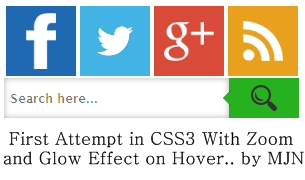
    First attempt in CSS3, Zoom and Glowing Effect Widget by MJN

    Here is a Live Demo :  Make Sure That the Images Loads completely..


  • How to add this to your Blog ?? Here it is..
    • Go to Blogger and go to your blog..
    • Now go to Layout in Left side of your Blogger Dashboard..
    • Now click on Add Gadget and Choose HTML/JavaScript..
    • Now paste the Below Set of codes in it..
    <style>
    .mjn-metro-social
    {
    width:300px;
    }
    .mjn-metro-social li
    {
    position:relative;
    cursor:pointer;
    padding:0;
    list-style:none;
    }
    .mjn-metro-social .fb,.tw,.gp,.pi,.in,.yt,.fd
    {
    z-index:7;
    float:left;
    margin:2.5px;
    position:relative;
    display:block;
    }
    .mjn-metro-social .tw
    {
    background:url(https://blogger.googleusercontent.com/img/b/R29vZ2xl/AVvXsEjQulwbBMnKmsfRx0POzvWB2L96NKXsX7LZjoxQ33GNAcX7So9NFRAiG6Fe3R7nC42HksQLkgMY4SofZRzchlbbW_dGnRFBtx5t5entIzhlcytb1m94ojaaX_xBL2JAzoJMl5wH-Qu7Xuw/h120/twitter-bird-dark-bgs.png) no-repeat center center #43b3e5;
    width:70px;
    height:70px;
    -webkit-transition: box-shadow .3s linear, background .2s linear;
    -moz-transition: box-shadow .3s linear, background .2s linear;
    -ms-transition: box-shadow .3s linear, background .2s linear;
    -o-transition: box-shadow .3s linear, background .2s linear;
    transition: box-shadow .3s linear, background .2s linear;
    }
    .mjn-metro-social .fb
    {
    background:url(https://blogger.googleusercontent.com/img/b/R29vZ2xl/AVvXsEig0PkzBvJ6yX3wb3bA-FnBs3mldrtIpOsKEOmSWPAniZThvUnV75mjGu8ZnA5a2Scx_f9Z-om5OP57CPaGbsj9rKbY1I0KVT_imrB47BFIjiw9xAk_uMf4Go4aCUmsMz0nnJ2yMLoBVZ8/h120/facebookf.png.png) no-repeat center center #1f69b3;
    width:70px;
    height:70px;
    -webkit-transition: box-shadow .3s linear, background .2s linear;
    -moz-transition: box-shadow .3s linear, background .2s linear;
    -ms-transition: box-shadow .3s linear, background .2s linear;
    -o-transition: box-shadow .3s linear, background .2s linear;
    transition: box-shadow .3s linear, background .2s linear;
    }
    .mjn-metro-social .gp
    {
    background:url(https://blogger.googleusercontent.com/img/b/R29vZ2xl/AVvXsEii2BXQh4OB62iwqr6bxaehbhAYmpzMa6iqzFVuT9KaIitHepXXhcCI6FkjOfbFV31PGat-8ivlSibqnqzYrcXcd-NFFluDQXePnX47zVrnZsoo_SE6c40BIhyphenhyphenbY2LhYLWrNbnbA0OxT00/h120/google+plus.png) no-repeat center center #da4a38;
    width:70px;
    height:70px;
    -webkit-transition: box-shadow .3s linear, background .2s linear;
    -moz-transition: box-shadow .3s linear, background .2s linear;
    -ms-transition: box-shadow .3s linear, background .2s linear;
    -o-transition: box-shadow .3s linear, background .2s linear;
    transition: box-shadow .3s linear, background .2s linear;
    }
    .mjn-metro-social .fd
    {
    background:url(https://blogger.googleusercontent.com/img/b/R29vZ2xl/AVvXsEiSWik21LDLYj6zRL0FnbdbT_B6IeTwEkK2L95p4b59u2u6DZLu3MmNwUl5uzoweLXsLHP5S-NDfxU0qFaJw6T6w7o2UGElDUMw9DYpN2J2kCI4zJIhJiNP8pi7YRKbCiTgIxcTLdI32QA/h120/feed.png) no-repeat center center #e9a01c;
    width:70px;
    height:70px;
    -webkit-transition: box-shadow .3s linear, background .2s linear;
    -moz-transition: box-shadow .3s linear, background .2s linear;
    -ms-transition: box-shadow .3s linear, background .2s linear;
    -o-transition: box-shadow .3s linear, background .2s linear;
    transition: box-shadow .3s linear, background .2s linear;
    }
    .mjn-metro-social li:hover .fb
    {
    background:url(https://blogger.googleusercontent.com/img/b/R29vZ2xl/AVvXsEhoufjylJBmxED6WGURsnNgtpBOyWSqC-SmKMlIdsyh_IwyJhnrBgwFeGI4QEtny3oFetBqZgHO7snxAJYtdIm-ZSEtNK7Q1-DyUf1GNW6X4eZ3KlTiL1wYi4cBtEPsKJBqSvplEzyGVVs/h120/facebookfh.png) no-repeat center center #1f69b3;
     box-shadow:0px 0px 6px 3px #217BC0;
    -webkit-box-shadow:0px 0px 6px 3px #217BC0;
    -moz-box-shadow:0px 0px 6px 3px #217BC0;
    -o-box-shadow:0px 0px 6px 3px #217BC0;
    -ms-box-shadow:0px 0px 6px 3px #217BC0;
    }
    .mjn-metro-social li:hover .tw
    {
    background:url(https://blogger.googleusercontent.com/img/b/R29vZ2xl/AVvXsEhXkUZeAqg6YBHVBNkDTurN2yeGTnC2K9KQT9VC7OULvF4ycuKo27_68Hq-tsMDJWC1eRRKeu-R6DP8gn0FguTsUzEDu4POC4_cwqc5Q3_sU7GhU3-cYBmy_uYBzS4090wRCYwtXs-CyQ4/h120/twitter-bird-dark-bgsx.png) no-repeat center center #43b3e5;
     box-shadow:0px 0px 6px 3px #38D1F7;
    -webkit-box-shadow:0px 0px 6px 3px #38D1F7;
    -moz-box-shadow:0px 0px 6px 3px #38D1F7;
    -o-box-shadow:0px 0px 6px 3px #38D1F7;
    -ms-box-shadow:0px 0px 6px 3px #38D1F7;
    }
    .mjn-metro-social li:hover .gp
    {
    background:url(https://blogger.googleusercontent.com/img/b/R29vZ2xl/AVvXsEhWtxhYdCkrpw9XOb_o2ZrFnC6MdR2FL6_MAoT1D2AO6E4QPvehzSQAg5Nu67vWXZU1brCbBkYJ9rKTXCh782N1IiQdeRDCKS8ZkRAkous_Vsor2l04fw9_k5fMqP-HaQPTxTzg1sDUHxg/h120/google+plush.png) no-repeat center center #da4a38;
     box-shadow:0px 0px 6px 3px #F43431;
    -webkit-box-shadow:0px 0px 6px 3px #F43431;
    -moz-box-shadow:0px 0px 6px 3px #F43431;
    -o-box-shadow:0px 0px 6px 3px #F43431;
    -ms-box-shadow:0px 0px 6px 3px #F43431;
    }
    .mjn-metro-social li:hover .fd
    {
    background:url(https://blogger.googleusercontent.com/img/b/R29vZ2xl/AVvXsEhx9RPW5iPvlSbYtgEJg_2-IcrmvKXN9Mo2D98Z1FPQJMsucDjDghuLobivNokqsnf0bZ4nNOT53TIzbz6F18ZnqkTmjOE_pbAZ2b-7EgAnBhT-N6lfHpNp1P8ysE0Tel2gvb_o51KgKoU/h120/feedh.png) no-repeat center center #e9a01c;
     box-shadow:0px 0px 6px 3px #e9a01c;
    -webkit-box-shadow:0px 0px 6px 3px #e9a01c;
    -moz-box-shadow:0px 0px 6px 3px #e9a01c;
    -o-box-shadow:0px 0px 6px 3px #e9a01c;
    -ms-box-shadow:0px 0px 6px 3px #e9a01c;
    }
    .cf:before, .cf:after{
        content:"";
        display:table;
    }
    .cf:after{
        clear:both;
    }
    .cf{
        zoom:1;
    }  
    /* Form wrapper styling */
    .form-wrapper {
        width: 280px;
    }
    /* Form text input */
    .form-wrapper input {
        width: 215px;
        height: 20px;
        padding: 10px 5px;
        float: left; 
        font: bold 12px 'lucida sans', 'trebuchet MS', 'Tahoma';
        border: 0;
    box-shadow: 0 0 6px rgba(0,0,0,.3) inset;
    webkit-transition: box-shadow .3s linear, background .2s linear;
    -moz-transition: box-shadow .3s linear, background .2s linear;
    -ms-transition: box-shadow .3s linear, background .2s linear;
    -o-transition: box-shadow .3s linear, background .2s linear;
    transition: box-shadow .3s linear, background .2s linear;
    }
    .form-wrapper input:focus {
        outline: 0;
        background: #fff;
        border-color: #51a7e8;
       box-shadow: 0 0 2px rgba(0,0,0,.8) inset;
    }
    .form-wrapper input::-webkit-input-placeholder {
       color: #999;
       font-weight: normal;
       font-style: italic;
    }
    .form-wrapper input:-moz-placeholder {
        color: #999;
        font-weight: normal;
        font-style: italic;
    }
    .form-wrapper input:-ms-input-placeholder {
        color: #999;
        font-weight: normal;
        font-style: italic;

    /* Form submit button */
    .form-wrapper button {
        overflow: visible;
        position: relative;
        float: right;
        border: 0;
        padding: 0;
        cursor: pointer;
        height: 40px;
        width: 75px;
        background:url(https://blogger.googleusercontent.com/img/b/R29vZ2xl/AVvXsEiMUHg7y6wjPhif11-U0822G0qf7lu-LaG_gMpHHNVB0CA0eeiF3zrX8pWMfhZ05whaTBN6aydnGfupwQ76uT17jAHigBtzOmuQEcsoDAjFtW7ko21EPspbfVgcrEBIZuUXH5Exe0D7Lgc/h120/1367665345_search.png) no-repeat center center #26B11E;
        border-radius: 0 0 0 0;   
        text-shadow: 0 -1px 0 rgba(0, 0 ,0, .3);
    webkit-transition: box-shadow .3s linear, background .2s linear;
    -moz-transition: box-shadow .3s linear, background .2s linear;
    -ms-transition: box-shadow .3s linear, background .2s linear;
    -o-transition: box-shadow .3s linear, background .2s linear;
    transition: box-shadow .3s linear, background .2s linear;
    }
    .form-wrapper button:hover{  
          background:url(https://blogger.googleusercontent.com/img/b/R29vZ2xl/AVvXsEiMUHg7y6wjPhif11-U0822G0qf7lu-LaG_gMpHHNVB0CA0eeiF3zrX8pWMfhZ05whaTBN6aydnGfupwQ76uT17jAHigBtzOmuQEcsoDAjFtW7ko21EPspbfVgcrEBIZuUXH5Exe0D7Lgc/h120/1367665345_search.png) no-repeat center center #26B11E;
    box-shadow:0px 0px 6px 3px #44D816;
    -webkit-box-shadow:0px 0px 6px 3px #44D816;
    -moz-box-shadow:0px 0px 6px 3px #44D816;
    -o-box-shadow:0px 0px 6px 3px #44D816;
    -ms-box-shadow:0px 0px 6px 3px #44D816;
    }
    .form-wrapper button:active,
    .form-wrapper button:focus{
        background:url(https://blogger.googleusercontent.com/img/b/R29vZ2xl/AVvXsEiMUHg7y6wjPhif11-U0822G0qf7lu-LaG_gMpHHNVB0CA0eeiF3zrX8pWMfhZ05whaTBN6aydnGfupwQ76uT17jAHigBtzOmuQEcsoDAjFtW7ko21EPspbfVgcrEBIZuUXH5Exe0D7Lgc/h120/1367665345_search.png) no-repeat center center #26B11E;
        outline: 0;
    }
    .form-wrapper button:before { /* left arrow */
        content: '';
        position: absolute;
        border-width: 8px 8px 8px 0;
        border-style: solid solid solid none;
        border-color: transparent #26B11E transparent;
        top: 12px;
        left: -6px;
    }
    .form-wrapper button:hover:before{
        border-right-color: #26B11E;
    }
    .form-wrapper button:focus:before,
    .form-wrapper button:active:before{
            border-right-color: #26B11E;
    }   
    .form-wrapper button::-moz-focus-inner { /* remove extra button spacing for Mozilla Firefox */
        border: 0;
        padding: 0;
    }  
    </style>
    <div class="mjn-metro-social">
    <li><a class="fb" href="http://www.facebook.com/mjntech"></a></li>
    <li><a class="tw" href="http://twitter.com/manjunathg17"></a></li>
    <li><a class="gp" href="https://plus.google.com/103741144523748761550"></a></li>
    <li><a class="fd" href="http://feeds.feedburner.com/mjntech"></a></li>
    <form action="/search" class="form-wrapper cf" id="searchthis" method="get" style="display: inline;">
    <input id="form-wrapper input" name="q" placeholder="  Search here.. " required="" type="text" />
    <button type="submit"></button>
    </form><br />

    • Now click save..That's it ..all Done!!

      Customization :

    • Now Replace Links Text Highlighted in Color Facebook,Twitter,Google+,RSS with your Link.. 
    • In some templates search box may not fit..so to change Height and Width Edit the Text Highlighted in Green Colur..
    •  


    Useful Note:


    Important Note:
    • You Can Comment If any Problem Persist.. or Need Help With This Widget..
    • This will be updated soon  with much more effects lately..


    I hope you have found this post helpful..
    Don't forget to Subscribe , Comment and Share this post..
    With Regard's ,

    Read Article

    01:24

    How to add Animated CSS3 Multi Drop Down Menu For Blogger ...

                                    In today's post I am Gonna Share about 'CSS3 Drop Down Menu' for your Blogger.. Many Of you Would be Searching  for this Code.. Isn't It Friendzzz..   So here I will Explain you how to insert Stylish Animated CSS3 Multilevel Drop Down Menu ... Just Follow The Steps..

    CSS3 Multi Level Drop Down Menu


    Features Of CSS3 Drop Down Menu:
                      It is one of the greatest CSS3 Drop down menu as it has heaps of handsome new features which make it unique from all menus. Let us look at few of its features.

    •  Easy to use, Optimized with CSS3..
    • Speedy, No compromise in blog speed..
    • Compatible with Mobile ,iPad Versions too.. 
    •  Stunning Multi Drop Down Menu..
    • Optimized with stunning Animated JQuery Jumping drop down effect..
    • Editing coding as easy as ABC..
     Animated Preview:


    Mobile Version Preview:


      How to Add CSS3 Multilevel Drop Down Menu..
      1. First Go to Blogger and Go to  your Blog..
      2. Now Click On page Elements In Left Side of your Blog..
      3. Now Click on Add Gadget..
      4. You Will Get Many Widgets..Scroll Down to HTML/JavaScript..
      5. Click On HTML/JavaScript..
      6. Now Paste This Below Set of Code in it..

      <style>
      #menu, #menu ul {
          margin: 0;
          padding: 0;
          list-style: none;
      }
      #menu {
          width: 960px;
          margin: 60px auto;
          border: 1px solid #222;
          background-color: #111;
          background-image: linear-gradient(#444, #111);
          border-radius: 6px;
          box-shadow: 0 1px 1px #777;
      }
      #menu:before,
      #menu:after {
          content: "";
          display: table;
      }

      #menu:after {
          clear: both;
      }

      #menu {
          zoom:1;
      }
      #menu li {
          float: left;
          border-right: 1px solid #222;
          box-shadow: 1px 0 0 #444;
          position: relative;
      }

      #menu a {
          float: left;
          padding: 12px 30px;
          color: #999;
          text-transform: uppercase;
          font: bold 12px Arial, Helvetica;
          text-decoration: none;
          text-shadow: 0 1px 0 #000;
      }

      #menu li:hover > a {
          color: #fafafa;
      }

      *html #menu li a:hover { /* IE6 only */
          color: #fafafa;
      }
      #menu ul {
          margin: 20px 0 0 0;
          _margin: 0; /*IE6 only*/
          opacity: 0;
          visibility: hidden;
          position: absolute;
          top: 38px;
          left: 0;
          z-index: 1;  
          background: #444;  
          background: linear-gradient(#444, #111);
          box-shadow: 0 -1px 0 rgba(255,255,255,.3);  
          border-radius: 3px;
          transition: all .2s ease-in-out;
      }

      #menu li:hover > ul {
          opacity: 1;
          visibility: visible;
          margin: 0;
      }

      #menu ul ul {
          top: 0;
          left: 150px;
          margin: 0 0 0 20px;
          _margin: 0; /*IE6 only*/
          box-shadow: -1px 0 0 rgba(255,255,255,.3);      
      }

      #menu ul li {
          float: none;
          display: block;
          border: 0;
          _line-height: 0; /*IE6 only*/
          box-shadow: 0 1px 0 #111, 0 2px 0 #666;
      }

      #menu ul li:last-child { 
          box-shadow: none;  
      }

      #menu ul a {  
          padding: 10px;
          width: 130px;
          _height: 10px; /*IE6 only*/
          display: block;
          white-space: nowrap;
          float: none;
          text-transform: none;
      }

      #menu ul a:hover {
          background-color: #0186ba;
          background-image: linear-gradient(#04acec, #0186ba);
      }
      #menu ul li:first-child > a {
          border-radius: 3px 3px 0 0;
      }

      #menu ul li:first-child > a:after {
          content: '';
          position: absolute;
          left: 40px;
          top: -6px;
          border-left: 6px solid transparent;
          border-right: 6px solid transparent;
          border-bottom: 6px solid #444;
      }

      #menu ul ul li:first-child a:after {
          left: -6px;
          top: 50%;
          margin-top: -6px;
          border-left: 0;  
          border-bottom: 6px solid transparent;
          border-top: 6px solid transparent;
          border-right: 6px solid #3b3b3b;
      }

      #menu ul li:first-child a:hover:after {
          border-bottom-color: #04acec;
      }

      #menu ul ul li:first-child a:hover:after {
          border-right-color: #0299d3;
          border-bottom-color: transparent;   
      }

      #menu ul li:last-child > a {
          border-radius: 0 0 3px 3px;
      }
      #menu-trigger { /* Hide it initially */
          display: none;
      }

      @media screen and (max-width: 600px) {

          #menu-wrap {
              position: relative;
          }

          #menu-wrap * {
              box-sizing: border-box;
          }

          #menu-trigger {
              display: block; /* Show it now */
              height: 40px;
              line-height: 40px;
              cursor: pointer;      
              padding: 0 0 0 35px;
              border: 1px solid #222;
              color: #fafafa;
              font-weight: bold;
              background-color: #111;
                      /* Multiple backgrounds here, the first is base64 encoded */
              background: url(data:image/png;base64,iVBOR...) no-repeat 10px center, linear-gradient(#444, #111);
              border-radius: 6px;
              box-shadow: 0 1px 1px #777, 0 1px 0 #666 inset;
          }

          #menu {
              margin: 0; padding: 10px;
              position: absolute;
              top: 40px;
              width: 100%;
              z-index: 1;
              display: none;
              box-shadow: none;      
          }

          #menu:after {
              content: '';
              position: absolute;
              left: 25px;
              top: -8px;
              border-left: 8px solid transparent;
              border-right: 8px solid transparent;
              border-bottom: 8px solid #444;
          }  

          #menu ul {
              position: static;
              visibility: visible;
              opacity: 1;
              margin: 0;
              background: none;
              box-shadow: none;              
          }

          #menu ul ul {
              margin: 0 0 0 20px !important;
              box-shadow: none;      
          }

          #menu li {
              position: static;
              display: block;
              float: none;
              border: 0;
              margin: 5px;
              box-shadow: none;          
          }

          #menu ul li{
              margin-left: 20px;
              box-shadow: none;      
          }

          #menu a{
              display: block;
              float: none;
              padding: 0;
              color: #999;
          }

          #menu a:hover{
              color: #fafafa;
          }  

          #menu ul a{
              padding: 0;
              width: auto;      
          }

          #menu ul a:hover{
              background: none;  
          }

          #menu ul li:first-child a:after,
          #menu ul ul li:first-child a:after {
              border: 0;
          }      

      }

      @media screen and (min-width: 600px) {
          #menu {
              display: block !important;
          }
      }
       /* iPad */
      .no-transition {
          transition: none;
          opacity: 1;
          visibility: visible;
          display: none;         
      }

      #menu li:hover > .no-transition {
          display: block;
      }
      </style>

      <br />
      <ul id="menu">
      <li><a href="Home URL-Here">Home</a></li>
      <li>

      <a href="/">Categories</a>

      <ul>
      <li>
      <a href="URL-Here">CSS</a>
      <ul>
      <li><a href="URL-Here">Item 11</a></li>
      <li><a href="URL-Here">Item 12</a></li>
      <li><a href="URL-Here">Item 13</a></li>
      <li><a href="URL-Here">Item 14</a></li>
      </ul>
      </li>
      <li>
      <a href="URL-Here">Graphic design</a>

      <ul>
      <li><a href="URL-Here">Item 21</a></li>
      <li><a href="URL-Here">Item 22</a></li>
      <li><a href="URL-Here">Item 23</a></li>
      <li><a href="URL-Here">Item 24</a></li>
      </ul>
      </li>
      <li>
      <a href="URL-Here">Development tools</a>
      <ul>
      <li><a href="URL-Here">Item 31</a></li>
      <li><a href="URL-Here">Item 32</a></li>
      <li><a href="URL-Here">Item 33</a></li>
      <li><a href="URL-Here">Item 34</a></li>
      </ul>
      </li>
      <li>
      <a href="URL-Here">Web design</a>
      <ul>
      <li><a href="URL-Here">Item 41</a></li>
      <li><a href="URL-Here">Item 42</a></li>
      <li><a href="URL-Here">Item 43</a></li>
      <li><a href="URL-Here">Item 44</a></li>
      </ul>
      </li>
      </ul>
      </li>
      <li>
      <a href="URL-Here">Work</a>
      <ul>
      <li><a href="URL-Here">Work1</a></li>
      <li><a href="URL-Here">Work2</a></li>
      <li><a href="URL-Here">Work3</a></li>
      <li><a href="URL-Here">Work4</a></li>
      </ul>
      </li>
      <li><a href="URL-Here">About</a></li>
      <li><a href="URL-Here">Contact</a></li>
      <li><a href="http://www.mjntech.blogspot.in/">MJN Tech</a>                                                    </li>
      </ul>
      </div>
      <script src="http://code.jquery.com/jquery-latest.min.js" type="text/javascript"></script>
      <script type="text/javascript">
          $(function() {
        if ($.browser.msie && $.browser.version.substr(0,1)<7)
        {
          $('li').has('ul').mouseover(function(){
              $(this).children('ul').css('visibility','visible');
              }).mouseout(function(){
              $(this).children('ul').css('visibility','hidden');
              })
        }
      });
      /* Mobile */
      $('#menu-wrap').prepend('<div id="menu-trigger">Menu</div>');      
      $("#menu-trigger").on("click", function(){
          $("#menu").slideToggle();
      });

      // iPad
      var isiPad = navigator.userAgent.match(/iPad/i) != null;
      if (isiPad) $('#menu ul').addClass('no-transition');
      </script>

      7.Now Click save ..


         Customization :

      • Now Replace "URL Here" Text Highlighted Pink with your Link..
      • And Replace the names beside "URL Here" Highlighted in RED ( such as Categories,About etc) to Appropriate name for the link..
      • That's it..Now Place It Where you need in your Blog such as Above Blog Post Column.


      Useful Note:
      • You can Also  Edit this menu like Width,Colour etc using HTML Editor of our Blog   : HTML Editor..
      • You can Also add Multilevel Menu's more than in Above HTML.. 


      Important Note:
      You Can Comment If any Problem Persist.. or Need Help With This menu for Extra sub Level's as in 'Live Demo'


      I hope you have found this post helpful..
      Don't forget to Subscribe , Comment and Share this post..
      With Regard's ,
      Read Article

      20:44

      20 Years on,World's First Web Page to be REBORN !!!


      Berners-Lee With First Web Software..             The world's first web page has been dragged out of cyberspace and restored for today's internet browsers as part of a project to celebrate 20 years of the web.
                   British physicist Tim Berners-Lee invented the world wide web, also called W3 or just the web, in 1989 to help physicists to share information.At the time it was just one of several such information retrieval systems using the internet.

      On April 30, 1993, the European Organization for Nuclear Research (CERN), where Sir Tim worked, made the web available to the world for free.

      A screenshot of the world’s first website, which — in a beautiful display of recursion — explains what a website is
              The technology was launched with the world's first website, which explained how the web worked.
             The site, hosted on Sir Tim's NeXT computer, allowed early browsers to learn about the basic features of the new system and create their own web pages.

      You can Also Take A look at World's First Website here as in This Pic :   The World's First Website!!

                               "It's one of the biggest days in the history of the web," CERN web manager Luke Noyes said of the historic day 20 years ago."CERN's gesture of giving away the web for free was what made it just explode."The site, which described the web as a "wide-area hypermedia information retrieval initiative", has long been dormant but CERN has now begun recreating the page.

                               Mr Noyes says the project will allow future generations to understand the origin and importance of the web and its impact on modern life"We're going to put these things back in place, so that a web developer or someone who's interested 100 years from now can read the first documentation that came out from the world wide web team," he said.

      'Missing disk'

                               The CERN team has restored the files using a 1992 copy of the first website, but hopes to find earlier copies."We know there is a missing disk that has a 1990 copy of the first website somewhere,"
                               Mr Noyes said, stressing that the restoration project is open and urging the public to get involved."Someone out there might know where [the disk] is, and we would really like some help and collaboration in tracking these things down," he said.Mr Noyes says the first browser was "actually very sophisticated, with images and features that don't really exist anymore, like being able to edit web pages as well as read them".
                             "We would like to somehow enable people to try this," he said.But he says it remains unclear how that will be accomplished.He says the CERN team is considering creating some kind of emulator, or possibly filming the process to show what it looked like.Mr Noyes says by making the birth of the web visible again, the CERN team aims to emphasise the idea of freedom and openness it was built on."
                               In the early days, you could just go in and take the code and make it your own and improve it. That is something we have all benefitted from," he said.He says while CERN is not promoting any specific ideology, "we want to preserve that idea of openness and freedom to collect and collaborate".Mr Noyes says other information sharing systems that had wanted to charge royalties, like the University of Minnesota's Gopher, "just sort of disappeared into history".

      Berners-Lee’s Used this NeXT Computer to develop and Run First World's Website..
                          Berners-Lee’s early WWW work was done on a NeXT Computer (created by Steve Jobs, after he left Apple in the ’80s as You can see in Image..         
                         Berners-Lee developed a simple text-based browser called WorldWideWeb in 1990 to accompany the project, but it wasn’t until the release of Mosaic by the National Center for Supercomputing Applications (NCSA) in 1993, following the open-sourcing of the WWW technologies, that the web really began to grow in earnest. Mosaic was a free-for-non-commercial-use graphical browser developed by Marc Andreessen and Eric Bina, with funding from Al Gore’s High Performance Computing and Communication Act of 1991 (yes, this is the basis of the Al Gore invented the internet story.) After graduating from university Andreessen went on to form the Mosaic Communications Corporation, in 1994 Mosaic changed its name to Netscape, in 1997 the first Browser War was sparked by Microsoft’s release of Internet Explorer 4 — and the rest, as they say, is history.

                         As for Tim Berners-Lee, he went on to found the World Wide Web Consortium (W3C) at MIT, with support from DARPA, after leaving CERN in 1994.  From there, he continues to guide the development of standardized, open web technologies, and thus the future of the web. The W3C’s primary goal is to ensure the continued compatibility of dozens of browsers, used by billions of surfers, accessing millions of web servers — and so far, despite a few spats involving WebGL and HTML5 DRM extensions, the Consortium seems to be doing rather well. 


      I hope You guys got at least some Info about World's First  Website..
      For More Updates Subscribe,Share and Comment...

      With Regard's ,

      Read Article

      06:35

      Social Media Sites Style Blogger Template - Facebook,Google+ and Twitter..

              Today there are many Social Media Sites.. But The 3 Most Popular Sites are Facebook, Google+ and Twitter..
      So today I am Gonna Share these Three Social Media Sites Style like Blogger Template..


      Let's Begin..

      1. Facebook Blogger Template

        As you all know that Facebook is one of the Best Social Media Site.. So today I am Gonna Share A Blogger Template which is Designed by 'DesignrsHub' with Facebook Style..
              Facebook style blogger template adds the social interactivity into your blogging experience, well this new template by DesignrsHub brings the color combination, style of the top bar and other stuff from the biggest social network the Facebook.

      2. Google Plus Blogger Template 

      As you all know Google+ is also one of Social Media Site as Twitter and Facebook..So here is a Blogger  Template As same as Google Plus.. Google Plus is out and its Blogger Template is out too. Blogger template by 'Creative Blogging Ideas'. Nothing Much To say about it as You can See Demo And Download It by going through the post..


      3. Twitter Blogger Template

      As you all know Twitter is also one of Social Media Site as Google+ and Facebook..So here is a Blogger  Template As same as twitter.. Twitter Blogger Template is inspired from world’s first micro blogging website Twitter.com. Though, this theme is not a replica of Twitter.com but still it has a touch which would convert your Blogger blog into a robust social networking website. The color combination of light blue and place gives it an elegant touch. Since, this theme is inspired from Twitter. Therefore, we have also attached twitter Tweet button. This Theme is extremely efficient and sober which makes it standout from other templates. It has some built-in extra-ordinary features like Numbered page navigation, floating header, and much more.

      Hope you guys liked it..For More Updates Subscribe,Share and Comment...

      With Regard's ,
      Read Article